Skip to Content
← All Odoo modules
Inventory & Manufacturing
OUR SPECIALTY

Inventory

✳︎ A warehouse where every unit has an alibi.

Odoo Inventory is built on double-entry stock moves: nothing appears, nothing vanishes - every unit is recorded from receipt to shelf to delivery. Lots, serial numbers and expiry dates with FEFO picking, barcode operations that work offline, and reordering rules that draft purchase orders before you run out. It is the module at the heart of most of our distribution projects.

RECEIVING DOCK - LIVE
LOT A FEFO LOT B LOT C SCANNER · OFFLINE OK RECEIPT → SHELF → DELIVERY - EVERY UNIT TRACEABLE
GS-1 / QR / EAN0 MS SCAN LATENCY
Where did those 14 units go?

Every warehouse run on spreadsheets eventually has the same meeting: the file says 220 units, the shelf says 206, and nobody can explain the difference. Odoo answers with an idea borrowed from accounting - double-entry inventory. Stock is never simply "adjusted": every unit moves from somewhere to somewhere, and the system keeps the receipt.

Stock is never "roughly right". Every unit came from somewhere and went somewhere.

That one principle unlocks everything else: lot and serial tracking with expiry dates, FEFO picking that ships the oldest stock first, cycle counts instead of full-shutdown inventories, and a search that tells you instantly where any product sits - across warehouses, even across companies. When a batch needs recalling, you know exactly which customers received it, in minutes.

FIG.01 - MIN/MAX REPLENISHMENT
MIN MAX STOCK ON HAND PURCHASE ORDER DRAFTED AUTOMATICALLY VENDOR FOLLOW-UP: PO CONFIRMED? ETA CONFIRMED? HITS MIN → ODOO ORDERS → STOCK REFILLS
Technical drawing · reordering rules
Picking, engineered
fewer meters walked = more orders shipped

The same team picks up to 30% more - by walking less.
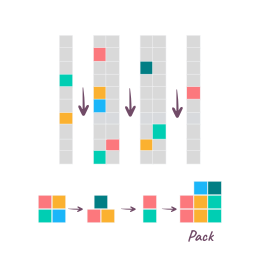
Wave picking diagram Wave picking Launch picking by aisle or zone, then merge everything at the packing area. Built for large warehouses.
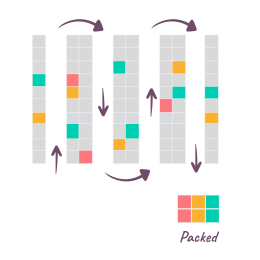
Cluster picking diagram Cluster picking Pick several orders in one pass, sorted into bins as you go - ready for packing. Ideal for small items.
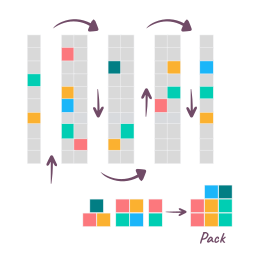
Batch picking diagram Batch picking Merge several orders into one picking run and consolidate at the packing zone. One trip instead of five.
SOURCE: ODOO.COM Add reservation strategies on top - Odoo decides which orders release to the floor, and when.
+30%
more picked & packed with the same team, using the right picking strategy
Offline
the barcode app keeps scanning with zero latency - no Wi-Fi dead zones
4
valuation methods your auditors accept: FIFO, AVCO, LIFO, Standard
FEFO
first-expired, first-out picking - expiry-dated stock ships in the right order
Inside the app
SOURCE: ODOO.COM
SCREEN 01 - STOCK IN REAL TIME
Odoo Inventory real-time stock
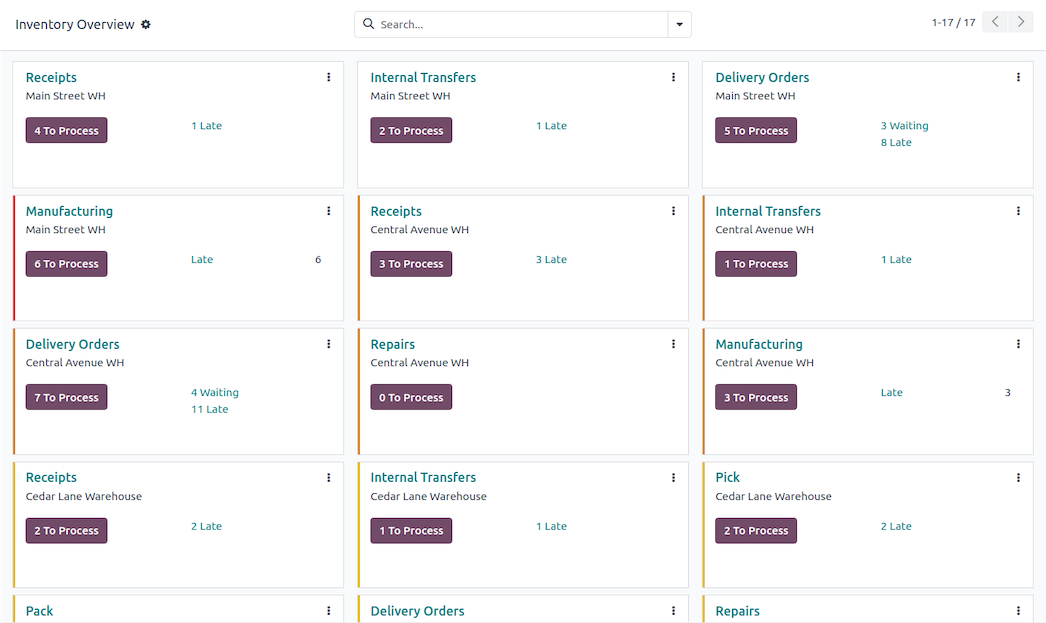
Serial numbers, lots, packages, cycle counts and KPIs - and an instant answer to "where is this product?" across every warehouse.
SCREEN 02 - SMART ROUTES
Odoo Inventory smart routes
Pull rules and configurable routes decide how goods flow - receiving, quality control, cross-docking, putaway by ABC analysis.
SCREEN 03 - TRACEABILITY
Odoo Inventory traceability report
The full biography of a lot: received when, stored where, shipped to whom. Recalls take minutes, not days.
Key capabilities
Spec sheet · 6 functions
Double-entry stock moves - every unit traceable from receipt to delivery
Multi-warehouse with internal transfers and instant product search
Lot / serial tracking, expiry dates and FEFO picking
Offline barcode operations: receipts, picking, cycle counts
Reordering rules, MTO and MPS with automated vendor follow-ups
Carrier integrations: labels, packages, boxes and pallets
In an ERPSWISS project
The heart of our distribution projects
STEP 1 Configure
We map your warehouses, routes, lots and reordering logic - for distributors like ALLPARA this is where the project starts.
STEP 2 Integrate
Inventory shares one database with Purchase, Sales and Accounting - stock valuation posts itself, no month-end reconciliation.
STEP 3 Train ✳︎
Warehouse staff learn barcode workflows on the floor, with your real products - part of our 7-step delivery.
Good to know

Odoo Inventory: one warehouse system, one shared database, zero double entry.

Odoo Inventory is the warehouse management system of the Odoo platform. Because it runs on the same database as purchasing, sales and accounting, a received pallet immediately updates available-to-sell quantities in the shop, drafts the vendor bill and posts stock valuation - with no connectors and no CSV exports. Companies switch to it from spreadsheets and standalone WMS tools that could not keep up with growth.

Day to day, teams use multi-warehouse operations with internal transfers; lot, serial and expiry tracking with FEFO; offline barcode scanning for receipts, picking and cycle counts; wave, cluster and batch picking strategies; and automatic reordering rules with vendor follow-ups. Valuation supports FIFO, AVCO, LIFO and standard price, perpetual or periodic.

ERP SWISS is an official Odoo partner and inventory is our home turf: most of our distribution projects - cosmetics, food, pharma-adjacent wholesale - are built around this module, including barcode hardware, batch and expiry flows, and Intrastat-ready reporting. Book a free demo to see it on your own warehouse.

See Inventory working on your own warehouse - on a free demo.
Book a Demo